Showing posts with label write-up. Show all posts

Tuesday, 24 April 2012

Uniten Hack@10 2012 binary write-up (ex02)

Continued from here

Now lets analyze the second binary.


It looks and behaves identically with the first one, we could simply try to backtrack to the check function through searching for static texts "Correct" and "Wrong".


This time, we try to search for all jumps to the "Wrong" section. Do this with Right Click at 013D111D > Find References to > Selected command


The results shows that only one jump is referred to this function. This could mean that there are only one check for this binary. But, we cant still be too sure as checks does not necessarily have to jump straight to the "Wrong" section. Lets go and see our jump over there with Right Click > Follow in Disassembler


A compare of EAX is what the binary checks for. But 467BB09B is a static number, so there must be some calculation done beforehand. Lets see what calculation is there.


That looked pretty short, we could just try to reverse this function to get EAX = 467BB09B. Lets see where our input goes. Place a breakpoint at 013D10D7, and run the check by pressing the check button at our binary. After the application stops at our breakpoint, look for the EAX value to see what if it holds.


So the application stops at our breakpoint. We've spotted our input string at our stack. But strangely enough, EAX is 0 at this point. Lets put a breakpoint higher to see how the binary process our input. Right click at 013D10C6 > Breakpoint > Toggle. Let the application finish running by pressing F9 once.


 After clicking the check button for the second time, we should land at our new breakpoint. The grey lines at the right column indicates that the binary will be going through some sort of function call. Looks like there are 3 arguments for this function call. Lets see if we can find our input string in any of them. Press F7 to step into instruction and Ollydbg will show the values of the argument as it passes through the respective operands.


While Arg3 and Arg2 shows nothing really interesting, Arg1 is the pointer to our input string. This means that our input string will be processed before going to the check function. Lets just skip the CALL function at 013D10D2 for now. Skip it by pressing step-over (F8) instead of step-into.


Unsurprisingly, our EAX is still zero for the input string "testing". Lets try with another input "123abc" and run the application to our breakpoint.


This is our new string, getting ready for the process function. We'll just step over the CALL function and see if EAX holds anything other than 0.


Aha! Finally, our input string has affected EAX. "123ABC" is available in hexadecimal, so the process function must have literally converted our input string to hexadecimal value. So now that we know we can set EAX to a hexadecimal value, we can surely obtain the flag by reversing the check function to find out what value produces the "Correct" statement.
A good knowledge in assembly is required to reverse the check function. For this example, I would translate the assembly instructions into C instructions, so that we can reverse it in C and see what EAX should be.

These are the assembly instructions that we need to reverse:
ADD EAX,45370DF7
XOR EAX,AAFBBCBE
ADD ESP,0C ; We can safely remove this operand, it has nothing to do with EAX
ADD EAX,0D1507BA
ROL EAX,5 
XOR EAX,BA14C823

Notice the ROL EAX, 5 operand. This operation is a bitwise rotation operation, and is not available at most higher level languages, even in C. But theres a workaround to it, a simple two shift and or operation could do the trick.

int rol(unsigned int x, int n)
{
        return ((x >> (32-n)) | (x << n)); //32 for 32 bits
}

Now lets prototype a C program that does the same as the binary.

int rol(unsigned int x, int n)
{
        return ((x >> (32-n)) | (x << n)); //32 for 32 bits
}

int main()
{ 
        int a = 0;
        a = a + 0x45370DF7; //ADD EAX,45370DF7
        a = a ^ 0xAAFBBCBE; //XOR EAX,AAFBBCBE
        a = a + 0x0D1507BA; //ADD EAX,0D1507BA
        a = rol(a, 5);      //ROL EAX,5 
        a = a ^ 0xBA14C823; //XOR EAX,BA14C823
        printf("%X", a);
        return 0;
}


To test our code, we should try input a = 0 first, so we can check whether the result is equals as per our binary's check procedure.


Remove all previous breakpoints. Set a new one at our CMP function just before the conditional jump.
Set the binary to check for "testing" or any other invalid hexadecimal strings so that EAX = 0, which is equals to a = 0 in our C code.


Now we have obtained the value of EAX as what it should be if the starting value of EAX is 0. Lets see if our application gets the same result.


Yes! 2623E85C is exactly what we're looking for. So now that we have successfully ported the assembly codes to C codes, we could reverse our C code to obtain the flag.
ROL function is a bit rotate-left function, so we must first define ROR function in C that does the exact opposite of ROL.

int ror(unsigned int a, int n)
{
        return (a >> n) | (a << (32-n));
}

It's done, so lets reverse everything else :
int main()
{
        int a = 0x467BB09B; // obtained from CMP EAX,467BB09B
        a = a ^ 0xBA14C823; // a = a ^ 0xBA14C823;
        a = ror(a, 5);      // a = rol(a, 5);
        a = a - 0x0D1507BA; // a = a + 0x0D1507BA;
        a = a ^ 0xAAFBBCBE; // a = a ^ 0xAAFBBCBE;
        a = a - 0x45370DF7; // a = a + 0x45370DF7;
        printf("%X\n", a); 
        return 0;
}


Well, we've scored another! :)

Uniten Hack@10 2012 binary write-up (ex01)

As these binaries are neither packed nor had implemented anti-debugging, so I lazily used the back-tracking method to obtain the flags. For most easy binaries, it should not be a problem.

You can get the binaries right here.
Tools required : OllydbgPEiD.
Prior knowledge required : Assembly language (x86), basic debugging, windows.
Note : Addresses in this tutorial could differ from yours. If so, use your addresses instead of mine.

Lets start:

It is a good practice in reverse engineering, that we scan PEs for the signature, packer and compiler information.
This is what PEiD found for all 6 binaries :


Nothing really interesting here, except for ex05.exe which is a C# program. By chance, we could decompile it easily if it had not been protected.

So lets start with the first binary. Fire up your debugger, and open ex01.exe.

By default, Ollydbg should automatically break at the program's Entry Point, if you had not fiddle with the debugging options. Just run the application with F9.


Well, the dialog had shown up. As we can see, Answer is where we put the password or flag, and status would show either we got it right or wrong. Lets try with the word "testing".


Not surprisingly, we've got it wrong. Notice the "Wrong!!" text, I would assume this is stored as static text in the binary. Static texts are searchable with ollydbg as it automatically analyzes pointers to consecutive  printable ASCII characters sequences.


Open up memory map with ALT-M.
Then right click at the ".text" section of ex01, and click on "View in CPU Disassembler":


Then, right click at anywhere on CPU window, choose Search for > All referenced strings


There you can see, Ollydbg has found several static strings made up of ASCII values. "Correct!!" and "Wrong!!" are the strings that we're looking for. Right click on "Correct!!", and Follow in Disassembler.


We now landed on the part of the program where it produces "Correct" and "Wrong". Our objective here is to analyze the "check" procedure of the binary, and intercept its logic so that we can obtain the flag.


Notice the "CMP EDX,14" and "JNE SHORT 0132112E" opcodes.
0132112E is the address where the program changes its status to "Wrong!!". This must be some sort of a check. A wild guess, this could be checking the input length. If our input is not 20-characters-long (14 for hexadecimal), it would jump straight to "Wrong". So our EDX must be exactly 14 at the compare operand.

Scroll up, we can see that there are some looping going around (Ollydbg indicates it with the black lines going from jump operand upwards).


Curiously, we can see that the bigger loop also have a conditional jump procedure which jumps to "Wrong!!". This must another check. So what does it check for? We can determine it by the compare operand above.

The compare operand checks 
[EDX+132300C] with AL. So either one of these parameters could be the pointer to our flag. 
So lets place a breakpoint at 013210E0 to find out. Right click at 013210E0 > Breakpoint > Toggle:


After placing a breakpoint, the address 013210E0 should be highlighted in red. This indicates that if the program executes at the address, Ollydbg would interfere and stop the program's execution, and start debugging. It would wait for user input to step-in and execute instructions. Press the Check button over our binary so that it runs through the check procedure. The process would halt as debugger has caught its thread.


We start at 013210E0.


The opcode at 013210E0 is "MOV AL,BYTE PTR SS:[EDX+ESP+0C]"
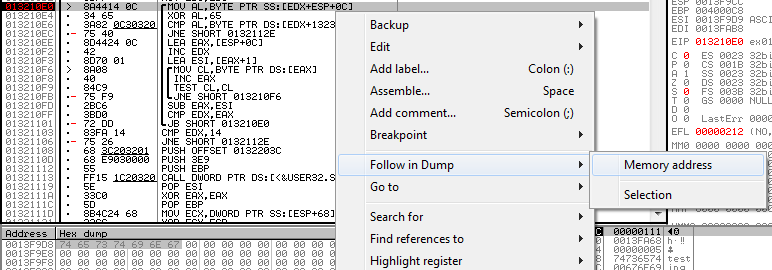
This indicates that AL will obtain data from the pointer [EDX+ESP+0C] which is in our stack. This could be our flag. Lets see what is in there. Right click, Follow in Dump > Memory address.

Aha! We have found our input string. So if AL is our input string, the latter must be our flag. Lets see what does the next instruction do with AL.


An XOR! This is definitely important. The next compare operand should point to our flag. Press F7 to step into the instructions. Stop at the compare operand.

So now we have arrived at the compare instruction, we could directly access to the data in [EDX+132300C]. Right click, Follow in Dump > Memory address.


This is the dump at [EDX+132300C]. Select 20 (remember the length check) first bytes, and copy it with Right Click > Edit > Binary copy


So now that we have our encrypted flag, we should decrypt it with the same encryption which is XOR 65. A simple python script could achive this:


string = [  0x32, 0x00, 0x09, 0x06, 0x0A, 0x08, 0x00, 0x45, 
   0x11, 0x0A, 0x45, 0x2D, 0x04, 0x06, 0x0E, 0x25, 
   0x54, 0x55, 0x44, 0x44 ,0x65  ]

result = ""
for i in string:
 result += chr(i^0x65)
 
print result

Congratulations, you have just captured the first flag:
:)